Sunday, August 9, 2009

Yet Another Process Monitor Manages Running Tasks

0 comments
Windows only: System monitoring utility Yet Another Process Monitor is not just a powerful way to see what's going on under the hood—it's also portable


Once you've


downloaded and extracted the no-installation-required software, you can put it on a flash drive or take it anywhere you'd like—so long as the target system has .NET Framework 2.0 installed. The utility can do everything you'd expect from a process manager, including a nice option to right-click a process and search the internet for more information.

There are plenty of more powerful features for the more tech-savvy, like detecting hidden processes, monitoring remote machines, and even viewing the memory of a process in a hex editor. Yet Another Process Monitor is free and open source, available for 32-bit Windows systems only.


Windows 7 upgraders guide: The simple version

0 comments


Microsoft released a nice, big chart the other day which details the many possible ways of moving from your existing Windows OS to Windows 7. It's got a slight case of information overload, however, so let's simplify things a bit. After all, not everyone reading Download Squad is an IT director with years of experience.


First, let's spell out the important terms.

In-Place Upgrade: means one you can run from your current Windows desktop. If f you currently own a laptop or desktop with Windows Vista Home Premium you will be able to boot up your computer as normal, pop in your Windows 7 Home Premium disk, and upgrade Windows. Your existing data (music, pictures, etc.) and programs are automatically moved.

Custom Install: "Custom" here really means "new," "fresh," or "clean." When you finish installing Windows your new desktop will be pretty bare - none of your old programs of data will be there, so you'll need to back them up first. Custom installs can't be performed from your existing Windows desktop. You have to force your system to boot from the Windows 7 DVD instead.


Friday, August 7, 2009

Free FLV Player To Display Videos In Websites

0 comments

FLV Player is an open source & free resource to display FLV files on websites.

It is compatible with FLV version 1.1 & comes in 5 types:

  • mini: player with a start/pause button & timeline control
  • normal: mini + stop button
  • maxi: normal + sound & fullscreen buttons
  • multi: maxi + multiple video display option
  • JavaScript: a player with no graphical interface but can be totally controlled via JS

The player can be controlled with keyboard for a better accessibility.

Download links can be found inside the "details" page of each player version.


Thursday, August 6, 2009

Arora: A light-weight, cross-platform web browser based on WebKit

0 comments


Arora is an open source
web browser that uses the same WebKit rendering engine found in Safari
and Google Chrome. But unlike those browsers, Arora is already capable
of running on Windows, Linux, and OS X, as well as a few other
platforms including FreeBSD.

That's because Arora is built to
work on any platform that supports the Qt toolkit.

The
browser has a couple of features that are all the rage with the kids
these days, including full page zoom (as opposed to text-only zooming),
and a private browsing mode that will let you surf without saving any
cookies or other personal data to the hard drive. It's also relatively
light on system resources, and boots and loads web pages reasonably
quickly.


Wednesday, August 5, 2009

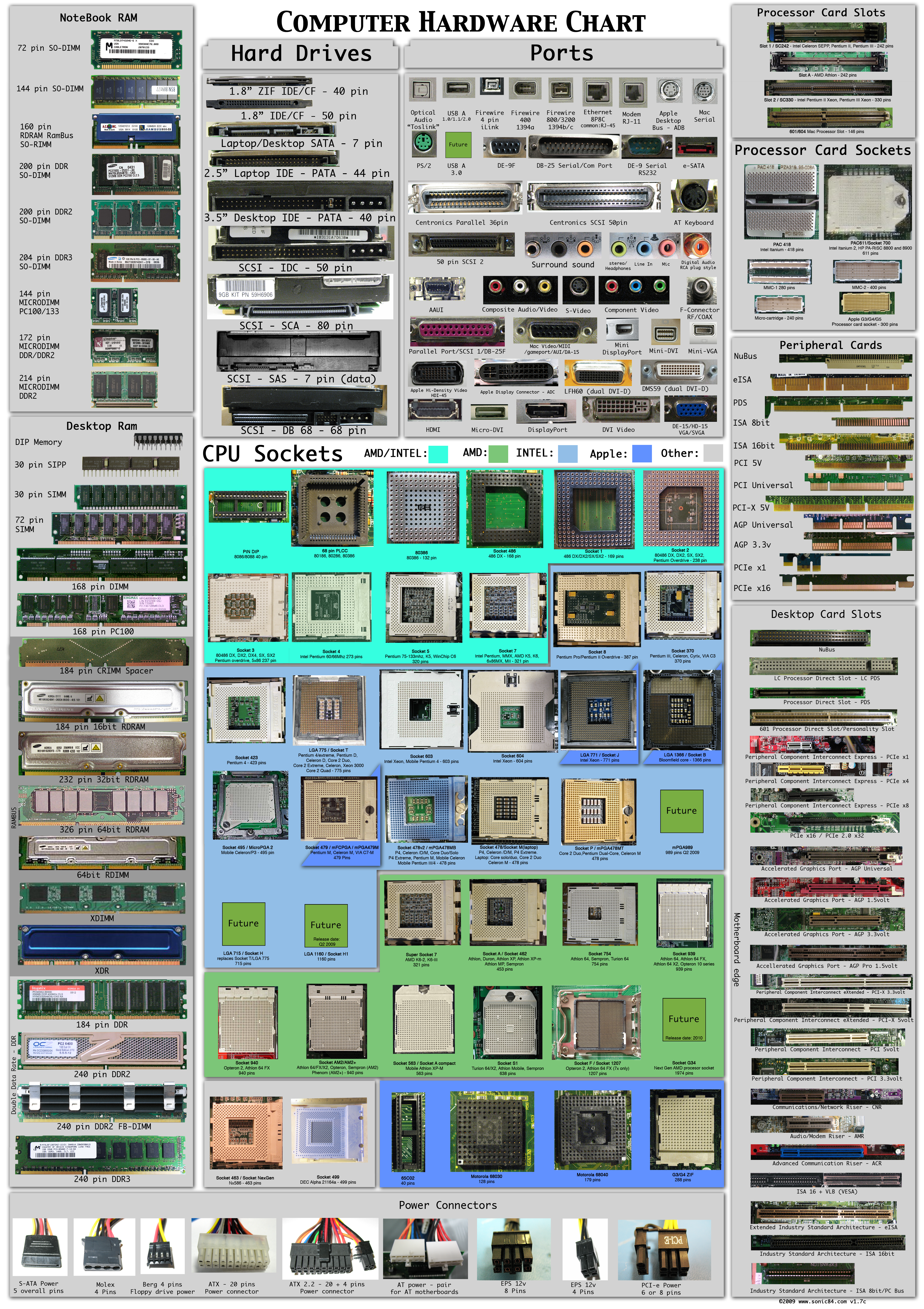
Computer Hardware Poster

1 comments

This will be very useful for a newbie to identify Computer hardware peripherals.It is clearly differentiate different parts of the computer. Click on the image to enlarge.

World’s Largest Website

0 comments


There are a few contenders here, since defining what makes a website the largest is hard to agree on. First up is 28 Fields – apparently this is the world’s largest website, taking 120 days to download over a DSL connection. But since I don’t have that kind of time, I don’t know if this site is useful anyway.

For physical dimensions, it could be World’s Highest Website. Coming in at a moon-scraping 18,939 kilometers or 11,77 miles high.

For sheer number of pages hosted, you could argue that Google or Archive.org’s Wayback Machine holds that honour. Google has a cache of almost every page it indexes, which is a significant portion of the Web and Archive.org has historical caches of tons of pages.


Dynamic Implementation of Javadocs

0 comments

You read and use the JavaDoc for your projects as in the past, but now you can
also view the Javadoc in any one of a variety of languages. Additionally, you
can add translations for some of the languages.It looks smart and loads fast. it is
well organized now. Check it.


Copyright 2008 All Rights Reserved Revolution Two Church theme by Brian Gardner Converted into Blogger Template by Bloganol dot com